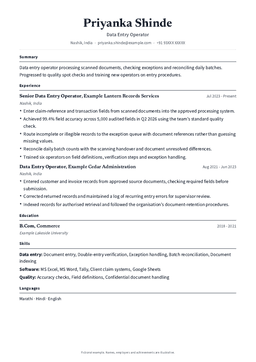
Office Assistant Resume Sample
Office assistant roles compare candidates on software fluency, multitasking range, and the responsibilities (filing, scheduling, vendor coordination, basic accounts) you have handled. This sample puts those skills upfront in the format admin and operations heads scan.
The full resume, in your choice of template
Every one of these is a real CareerOS template rendering this exact document — not a screenshot, and not a different person's resume. Pick one and the document below restyles into it.
Template · Modern
See all 22 side by side ↓Left-aligned, clean sans, accent tab headings. The contemporary default.
Sunita Devi
Office Administrator
Patna, Indiasunita.devi@email.com+91 87XXX XXXXX
Summary
Office administrator with 5 years keeping a 60-person office running: records, vendors, travel and the front desk. The person everyone asks when they cannot find something.
Experience
Office Administrator · Bihar Renewable Energy Development Agency
Apr 2022 – PresentPatna, India- Administer a 60-person office: correspondence, file management, vendor coordination and visitor handling.
- Manage a 14 lakh annual office budget across stationery, housekeeping, pantry and AMC contracts.
- Digitised 7 years of physical records into an indexed system, cutting document retrieval from about 20 minutes to under 2.
- Coordinate travel and accommodation for 25 field staff, including reimbursement processing.
- Renegotiated three vendor contracts at renewal, saving about 1.6 lakh a year.
Office Assistant · Sharma & Associates
Jun 2020 – Mar 2022Patna, India- Handled reception, call routing and appointment scheduling for a 12-person consultancy.
- Maintained client files, invoices and courier records.
- Prepared draft correspondence and meeting minutes.
Skills
- Administration:
- Records management, Vendor coordination, Travel and expense processing, Front-desk management, Inventory control
- Software:
- MS Word, MS Excel, Google Workspace, Tally (basic)
- Communication:
- Business correspondence, Meeting minutes, Telephone handling
Education
- 2017 – 2020
B.A, History
Patna University · Second class
Certifications
- Diploma in Computer Applications (2020)
Languages
Hindi, English, Bhojpuri
Office Administrator resume format
This Office Administrator sample runs 7 sections in one column, reverse-chronological, with the experience above the education. In order:
- Header — name, job title, city, email and phone
- Summary — 26 words, no heading beyond the label
- Experience — 2 roles, 8 bullets, newest first
- Skills — 12 listed under 3 headings
- Education — 1 qualification
- Certifications — 1
- Languages — Hindi, English and Bhojpuri
Nothing is centred, nothing is in a table, and no section is a graphic. Everything a parser needs to read is text in the order a human reads it.
The summary this Office Administrator resume opens with
26 words, and it opens on "Office administrator with 5 years…" rather than on what the candidate is looking for.
Office administrator with 5 years keeping a 60-person office running: records, vendors, travel and the front desk. The person everyone asks when they cannot find something.
It is written to be read in one pass: what this Office Administrator does, where, and what they are measured on. Nothing in it repeats a bullet further down verbatim.
What the experience section looks like on an Office Administrator resume
2 roles, 8 bullets, 6 of them carrying a number.
- Office Administrator at Bihar Renewable Energy Development Agency — Apr 2022 to Present, 5 bullets
- Office Assistant at Sharma & Associates — Jun 2020 to Mar 2022, 3 bullets
The line that does the most work here:
Digitised 7 years of physical records into an indexed system, cutting document retrieval from about 20 minutes to under 2.
Skills an Office Administrator resume lists
12 skills, split into 3 groups (Administration, Software and Communication) rather than one long comma-separated line.
- Administration
- Records management · Vendor coordination · Travel and expense processing · Front-desk management · Inventory control
- Software
- MS Word · MS Excel · Google Workspace · Tally (basic)
- Communication
- Business correspondence · Meeting minutes · Telephone handling
Education and certifications on an Office Administrator resume
One qualification, listed after the experience because the experience is what is being hired.
- B.A in History · Patna University · 2017–2020 · Second class
Certifications, named in full with the year:
- Diploma in Computer Applications (2020)
ATS keywords in this Office Administrator sample
An applicant tracking system matches text. These 15 terms are the ones this document actually contains — its skills, the titles it has held, the certifications it names — not a wishlist bolted onto the bottom of the page.
- Records management
- Vendor coordination
- Travel and expense processing
- Front-desk management
- Inventory control
- MS Word
- MS Excel
- Google Workspace
- Tally
- Business correspondence
- Meeting minutes
- Telephone handling
- Office Administrator
- Office Assistant
- Diploma in Computer Applications
What goes wrong on Office Administrator resumes
Each of these is what the sample above avoids, with the sample's own line as the evidence:
- Bullets that list duties instead of results. 6 of the 8 here carry a number: "Renegotiated three vendor contracts at renewal, saving about 1.6 lakh a year."
- An objective that runs five lines and says nothing. This summary is 26 words.
- One undifferentiated list of every tool ever opened. This sample separates Administration, Software and Communication.
- Undated roles, which read as a gap being hidden. Every role here is dated, Jun 2020 to Present.
- Certifications mentioned inside a paragraph. This one lists them separately, starting with Diploma in Computer Applications (2020).
- A contact line a recruiter has to hunt for. Here it is the first thing on the page, one line under Sunita Devi: city, email, phone.
What this Indian Office Administrator resume leaves out
The whole header is 5 lines — the name Sunita Devi, the job title Office Administrator, the city (Patna, India), an email address and a phone number. Six things an Indian resume template will still offer you, none of which are here:
- A photograph. The document opens on the name Sunita Devi and the title Office Administrator, which is what a shortlisting screen reads.
- Date of birth, age, marital status and gender. None of them predict whether an Office Administrator can do the work.
- Father's or husband's name, which belongs on a form, not on a resume.
- A full postal address. The city line is "Patna, India" and stops there — recruiters filter on the city.
- Current and expected CTC. It is a negotiation, and it is not a qualification.
- A declaration paragraph with a signature. The document ends on the certifications.
Naukri headline for an Office Administrator
Naukri shows a resume headline at the top of the profile, and it is the line a recruiter reads before opening anything. Built from this sample — its title, the experience it shows, the skills it leads with — it reads:
Office Administrator | 6 yrs | Records management, Vendor coordination, Travel and expense processing, Front-desk management
Every term in it appears in the document below, so the profile and the resume answer the same search instead of two different ones.
Fresher or experienced: which version of this Office Administrator resume you need
This one is written at 6.2 years of experience — Mid-Level, 3-8 yrs.
As a fresher in the same role, invert it: B.A in History, Patna University moves to the top, internships and coursework carry the middle of the page, and the summary names the skills instead of the scope.
The Ultimate Guide to Crafting the Perfect Office Assistant Resume Sample
Welcome to ResumeGuru — your go-to source for building a professional, well-organized Office Assistant Resume that gets noticed. Whether you’re applying in a corporate office, school, hospital, or startup, our Office Assistant Resume Samples and expert tips will help you stand out — even if you’re just starting your career.
Why a Strong Office Assistant Resume Matters
As an Office Assistant, you’re the backbone of daily operations. Employers expect you to be organized, dependable, and efficient. A strong resume should reflect your ability to support teams, handle administrative tasks, and keep operations running smoothly.
Our Office Assistant Resume Sample helps you present these strengths in an ATS-compliant and recruiter-friendly format that increases your chances of getting hired.
What Makes Our Office Assistant Resume Samples Stand Out
At ResumeGuru, we’ve designed templates to make resume writing simple and effective. These templates are:
- Clean, modern, and ATS-friendly office assistant resume sample
- Structured to highlight admin experience and multitasking abilities
- Customizable for both freshers and experienced professionals
These templates ensure your resume is easy to scan and professionally designed.
Tips to Write an Impressive Office Assistant Resume
Here’s how to craft a job-winning resume for an Office Assistant role:
Start with a Clear Summary
Begin with a 2–3 line statement that highlights your experience (if any), strong organizational skills, and familiarity with common admin tasks.
Showcase Key Administrative Skills
Mention skills such as:
- MS Office (Excel, Word, PowerPoint)
- Filing and data entry
- Scheduling appointments
- Handling emails and phone calls
- Record keeping and documentation
Highlight Relevant Experience
Even part-time roles, internships, or volunteer work count. Focus on responsibilities and how you supported the team or improved processes.
Example:
“Managed inventory and scheduled appointments for 4 departments, improving coordination and response time.”
Use Strong Action Verbs
Words like “Organized,” “Assisted,” “Maintained,” “Coordinated,” and “Scheduled” show your proactive approach.
Resume Structure: What to Include
Here’s a standard format for an Office Assistant resume sample:
Contact Information
Include your full name, phone number, email, and optionally LinkedIn.
Professional Summary
A quick overview of your strengths, such as multitasking, communication, and admin software knowledge.
Key Skills
List your strongest capabilities such as:
- MS Office & Google Workspace
- Data entry & file management
- Calendar scheduling
- Customer service
- Time management
- Front desk coordination
Work Experience
List roles in reverse order. Focus on day-to-day tasks and any measurable outcomes or improvements.
Education
Mention your degree or diploma (e.g., BA, BCom, or equivalent), your university, and the year of graduation.
Certifications (Optional)
Include certifications like:
- MS Office Specialist
- Business Communication
- Administrative Support
Achievements (Optional)
Include awards, process improvements, or extracurricular involvement that reflects your soft skills.
Office Assistant Resume Examples Based on Experience Level
- Entry-Level Office Assistant: Focus on internships, coursework, soft skills, and proficiency in tools like MS Office.
- Experienced Office Assistant: Emphasize how you supported teams, improved workflows, or handled large volumes of tasks.
- Senior Admin Support: Highlight leadership, document control, or executive-level support responsibilities.
Get Expert Help with Your Resume
Struggling to write your Office Assistant resume? ResumeGuru offers professional Resume Writing Services that:
- Transform basic experience into polished achievements
- Use ATS-optimized formatting and keywords
- Tailor resumes to specific job roles or industries
Build a Resume That Reflects Your Reliability
Office Assistants keep teams running — your resume should reflect that trust and professionalism. With ResumeGuru, you’ll get:
- Clean, effective resume templates
- Examples and expert tips
- Personalized writing support
- A format built for clarity and success
Ready to Create Your Office Assistant Resume?
Explore our Office Assistant Resume Samples, choose a template, or work with our resume writing experts — and start applying with confidence today.
📞 +91 99155 53497
All 22 templates on this resume
The same document as above, rendered by every template CareerOS ships. Pick one and the resume at the top of this page changes to it. A flagged template reads well to a human and parses less cleanly in an older ATS; the unflagged ones are single column, which is the safe default for an online application.
Related resume samples
Keep reading
Resume
Every Resume Section, and What Belongs In It
Summary, objective, experience, education, skills, projects, internships, extracurriculars, additional information: what each resume section is for, what goes in it, what to cut, and how to end a resume.
Applicant Tracking System (ATS)
How an ATS Actually Reads Your Resume
What an applicant tracking system does with your resume: parsing, field extraction, keyword matching and ranking. What actually breaks it, how to add keywords without stuffing, and how to tailor a resume to a job description.
Interview Preparation
Interview Preparation: The Whole Sequence
What to prepare for an interview and in what order: the types of questions you will face, the self-introduction, STAR answers, what to do and avoid on the day, and the questions to ask at the end.
Resume
Personal Details on an Indian Resume: What to Keep and What to Delete
Marital status, date of birth, nationality, passport number, photograph, father's name, declaration. Which personal details belong on an Indian resume in 2026, which cost you interviews, and the exceptions where they are genuinely required.

Our Commitment
Your career data is yours. Full stop.
Export it or delete it any time. We never sell it, never train public models on it, and never show it to anyone. And the AI never writes a word about you that you didn't live.
Move your career in.
Five minutes to set up. Free for your data, forever. The last place your career will ever need to live.